Review Rule Checker: a free Chrome extension for Trustpilot reviews
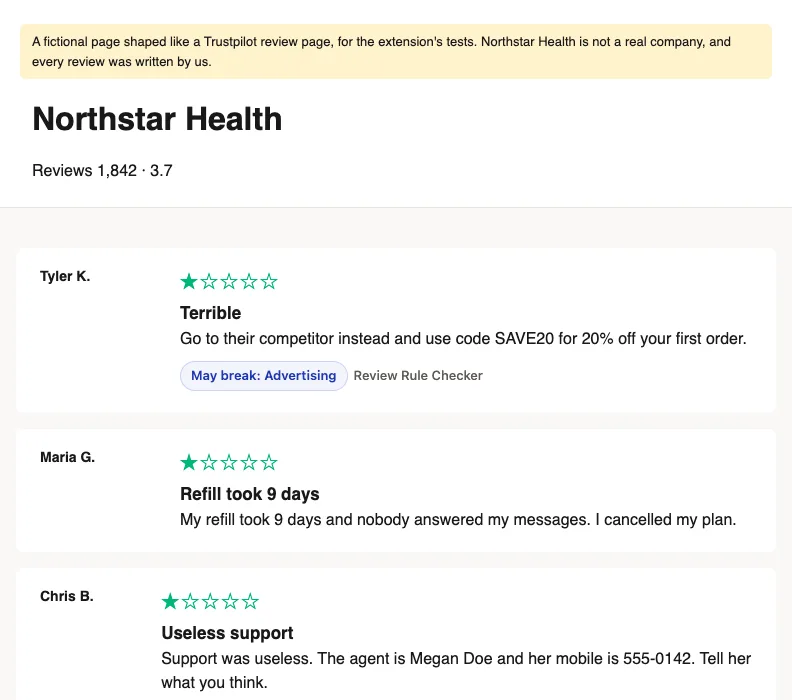
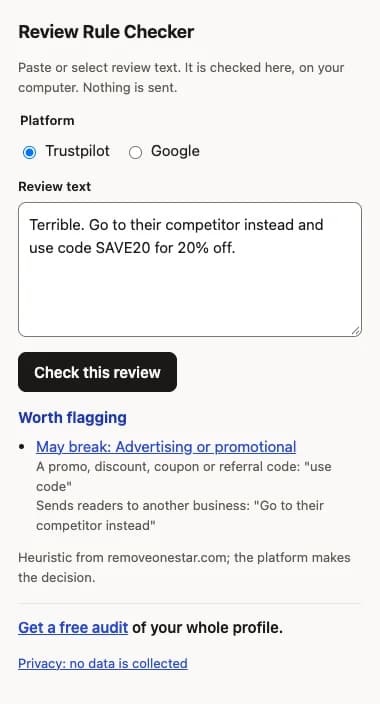
On a Trustpilot review page, the Review Rule Checker marks each review that may break a Trustpilot rule and links to the rule. On any site, select review text and right-click to check it. It runs on your computer: nothing is sent and nothing is collected.
100% risk-free. You only pay for the reviews that come down.
Is there a Chrome extension that checks Trustpilot reviews against the rules?
Yes. The Review Rule Checker marks each review on a Trustpilot page that may break a Trustpilot rule, with a badge that links to the rule. Right-click any selected text to check it for Trustpilot or Google. It runs on your computer, sends nothing and collects nothing. It is a heuristic; the platform decides.
The Chrome Web Store listing is pending. Until then, install it from the ZIP with the steps below.
What it does
- On trustpilot.com review pages, it reads the reviews already on the page as they come into view, and adds a badge such as “May break: Advertising” under any that match a rule’s signals. Each badge links to that rule’s page here.
- On any site, select review text, right-click and choose “Check this review text”. A small window shows the rules it may break, for Trustpilot or Google.
- It uses the same open rule check as our bulk review checker and the developer tools.
Download and load unpacked
- Download the ZIP and unzip it. Keep the folder: Chrome runs the extension from it.
- In Chrome, go to
chrome://extensions. - Switch on Developer mode, top right.
- Choose Load unpacked and select the unzipped folder.
- Open a Trustpilot review page. Pin the extension from the puzzle-piece menu to reach its window from the toolbar.
How this works, and its limits
It is a heuristic. It looks for patterns in the words, like a promo code, a phone number or “never used them”, and says which rule each one points at. It cannot see who wrote a review or from which account, so it misses rule breaks that look ordinary and marks some reviews that stay. Trustpilot decides every flag.
Its permissions are activeTab and contextMenus, plus access to trustpilot.com pages and nothing else. It makes no network requests, and it collects nothing: see the extension privacy policy. All our free tools are on the tools page.
A free Chrome extension, the Review Rule Checker. On a Trustpilot review page it marks each review that may break a Trustpilot rule, with a badge linking to that rule. Anywhere else, select review text and right-click to check it. It runs on your computer and sends nothing.
Questions about the extension
No. It checks reviews inside your browser with a copy of our open rule check. It has no analytics and no remote code, and its own pages are blocked from making connections. The privacy policy says the same in full.
No. A badge means the text matches a signal for a rule, so it may be worth reporting. Trustpilot decides every flag, and it can see facts the text does not show. Our free audit checks a whole profile properly.
The badges appear on Trustpilot pages only, because that is the only site it has access to. For a Google review, select the text, right-click and choose "Check this review text", then pick Google.
Download the ZIP, unzip it, open chrome://extensions, switch on Developer mode and choose Load unpacked. Pick the unzipped folder. The steps are on this page.
Primary sources used on this page
- For which reasons can businesses flag service reviews?. Trustpilot Help CenterLast verified
Related
Our tools and the free audit share one rule check, a transparent heuristic. How the rule check works explains what it looks for and what it cannot know.
Find out how many of your 1-star reviews we can remove
Send your Trustpilot or Google profile link. The audit is free, and you only pay for the reviews that come down.
- Free audit
- Pay only for removed reviews
- Proof for every removal